

Hi! Tap me 👋
Life on a Fraction
Know exactly what’s left until payday.
Your income is a loaf of bread. LOAF helps you slice it into Needs, Wants and Savings, and counts your month from one payday to the next.
For iPhone onlyNever asks for your bank login
How LOAF works
The whole idea, in three bites
1Slice your loaf
Your income is the loaf. Cut it into Needs, Wants and Savings. Start from 50/30/20 or choose your own fractions, then swipe each expense into its slice.
2Payday months
Your month starts the day you get paid and ends the day before your next payday. So when LOAF shows what’s left, that’s what you have until more money comes in.
3Savings garden
Money you save but haven’t given a job yet waits in the garden as bread. When you know what it’s for, drag it into a basket and watch the goal fill.

Try it right here
Have a nibble before you join
Three small demos of how LOAF works. Have a play.
Your slices
Drag the white handles to change your fractions.
- Needs₹25,000
- Wants₹15,000
- Savings₹10,000
Pick your payday to see your LOAF month.
LOAF does all of this for real, every payday.This is only a demo. Nothing you type here is saved or sent anywhere.
Join the beta →Features
Everything you need between paydays
Works in India, the UAE, the UK, the US, Canada and Australia, with the right currency for each.
The Cutting Board
Your home screen shows how much money you have left this month and how big your next card bill is.
Review Slices
Every expense you add waits here until you swipe it into Needs, Wants or Savings. That’s how LOAF learns where your money went.
Baskets
Give each savings goal a name, like “Emergency fund” or “New phone”, then put money in and watch it fill up.
Cards, kept separate
Card spending only leaves your account when you pay the bill, so LOAF tracks it separately and shows you what’s due and when.
Can I afford it?
Type in a price and LOAF works out whether you can afford it in cash or on your card, based on what’s left and how long until payday.
Recurring expenses
See your rent, subscriptions and other regular payments on a calendar.
Spending trends
See which months cost you the most, and tap any month for the details.
Payday reminders
LOAF can remind you on payday and on your card bill day. You pick which reminders you want, and they’re set up on your phone.
Never connects to your bank
You type in what you spend, so LOAF never sees your bank login or touches your money.
Your data stays yours
There are no ads in LOAF. Your data is never sold, and LOAF doesn’t track you across other apps.
Delete everything, any time
Settings → Account → Delete account removes your account and all your data.
Why type it in?
Why LOAF asks you to add expenses yourself
Plenty of money apps link to your bank and fill themselves in. LOAF asks you to add each expense, which takes a few seconds. Research on how people spend and stick to goals suggests those seconds are well spent.
You remember what you write down
Typing in an amount makes it stick, so you go into your next purchase with last week in mind. A list your bank fills in for you is easy to scroll past.
What the research found
Past payments made people want to spend less on the next thing, and the effect was strongest when they had to write down the amount they paid.
Soman, 2001Logging it keeps your goal in sight
Adding an expense is a quick check-in with your budget. Do it every day and you’ll notice a month going off track while there’s still time to fix it.
What the research found
Across 138 experiments with almost 20,000 people, keeping track of progress helped people reach their goals, and it helped more when they physically recorded that progress.
Harkin et al., 2016Cards make spending feel painless
Tapping a card hardly feels like paying, and the cost only lands when the bill does. LOAF gives card spending its own section, so you see the bill grow as you go.
What the research found
People bidding for basketball tickets offered nearly twice as much when they were told they’d pay by credit card instead of cash.
Prelec & Simester, 2001
A tip from the app: your bank already sends you a message for every payment. Leave those unread until you’ve added them to LOAF, and you’ll never have to rebuild a week of spending from memory.
Sources
- Soman, D. (2001). Effects of payment mechanism on spending behavior: The role of rehearsal and immediacy of payments. Journal of Consumer Research, 27(4), 460–474. doi.org/10.1086/319621
- Harkin, B., Webb, T. L., Chang, B. P. I., Prestwich, A., Conner, M., Kellar, I., Benn, Y., & Sheeran, P. (2016). Does monitoring goal progress promote goal attainment? A meta-analysis of the experimental evidence. Psychological Bulletin, 142(2), 198–229. doi.org/10.1037/bul0000025
- Prelec, D., & Simester, D. (2001). Always leave home without it: A further investigation of the credit-card effect on willingness to pay. Marketing Letters, 12(1), 5–12. doi.org/10.1023/A:1008196717017
These studies look at how people spend, remember and reach goals in general. None of them tested LOAF.
A peek inside
Fresh out of the oven
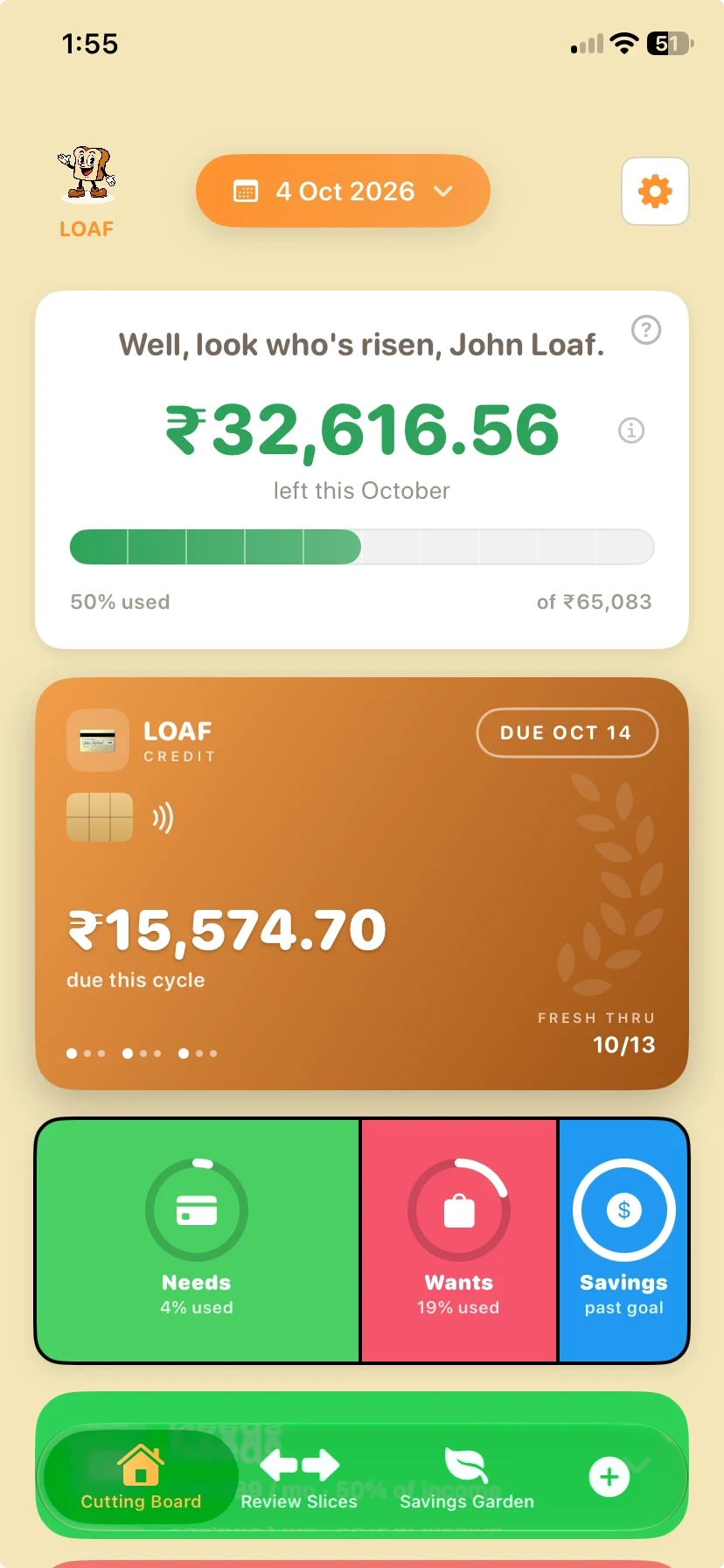
The Cutting BoardYour home screen, showing what's left until payday. 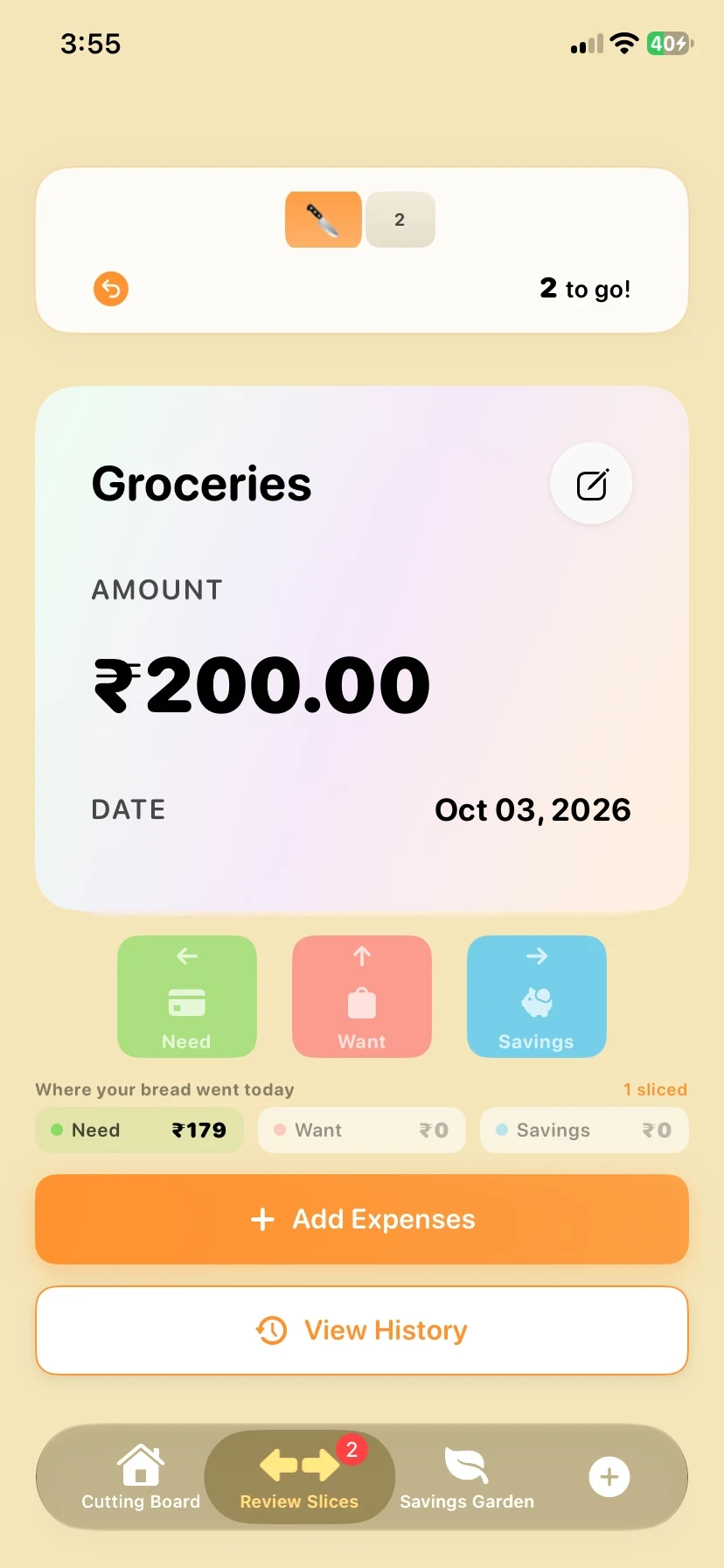
Review SlicesSwipe each expense into Needs, Wants or Savings. 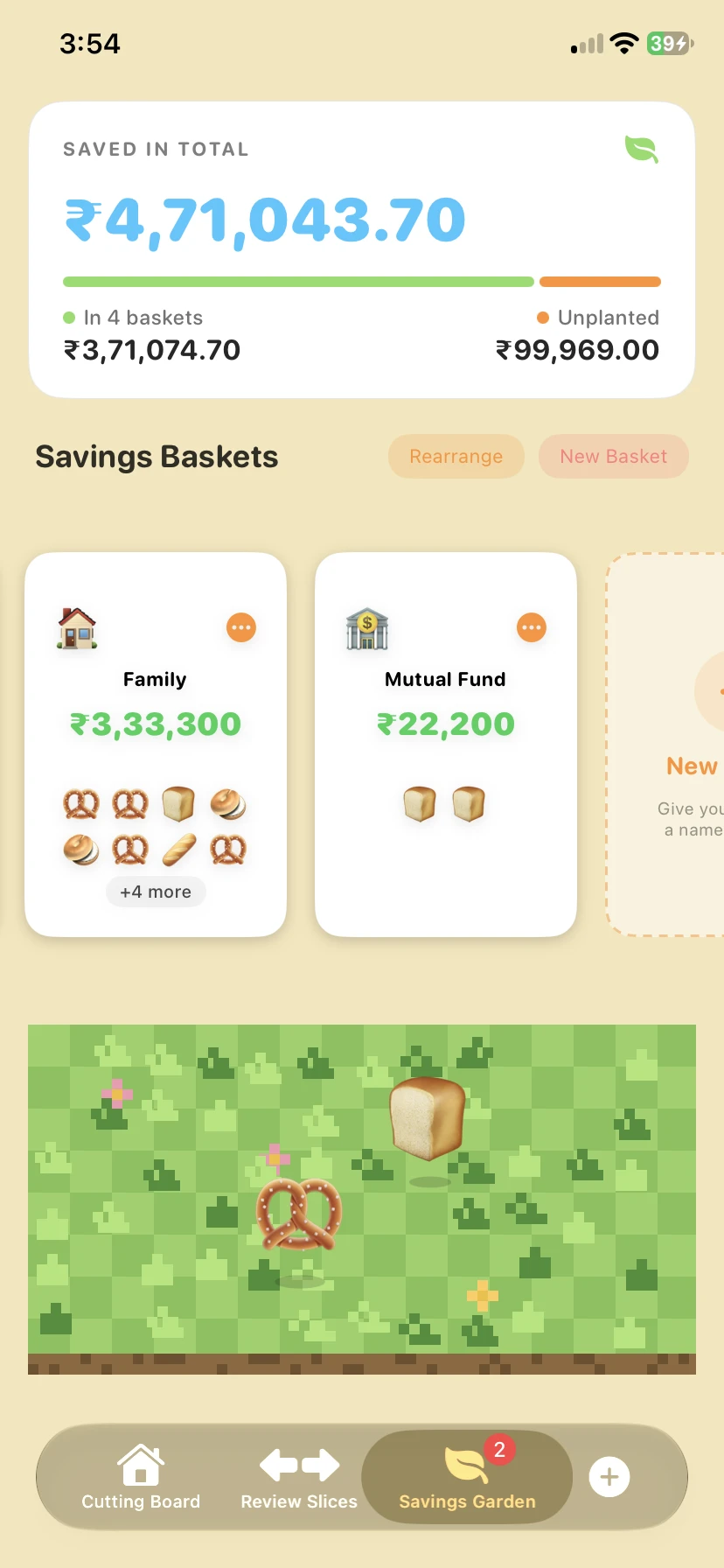
Savings GardenUnplanted savings, waiting as bread. 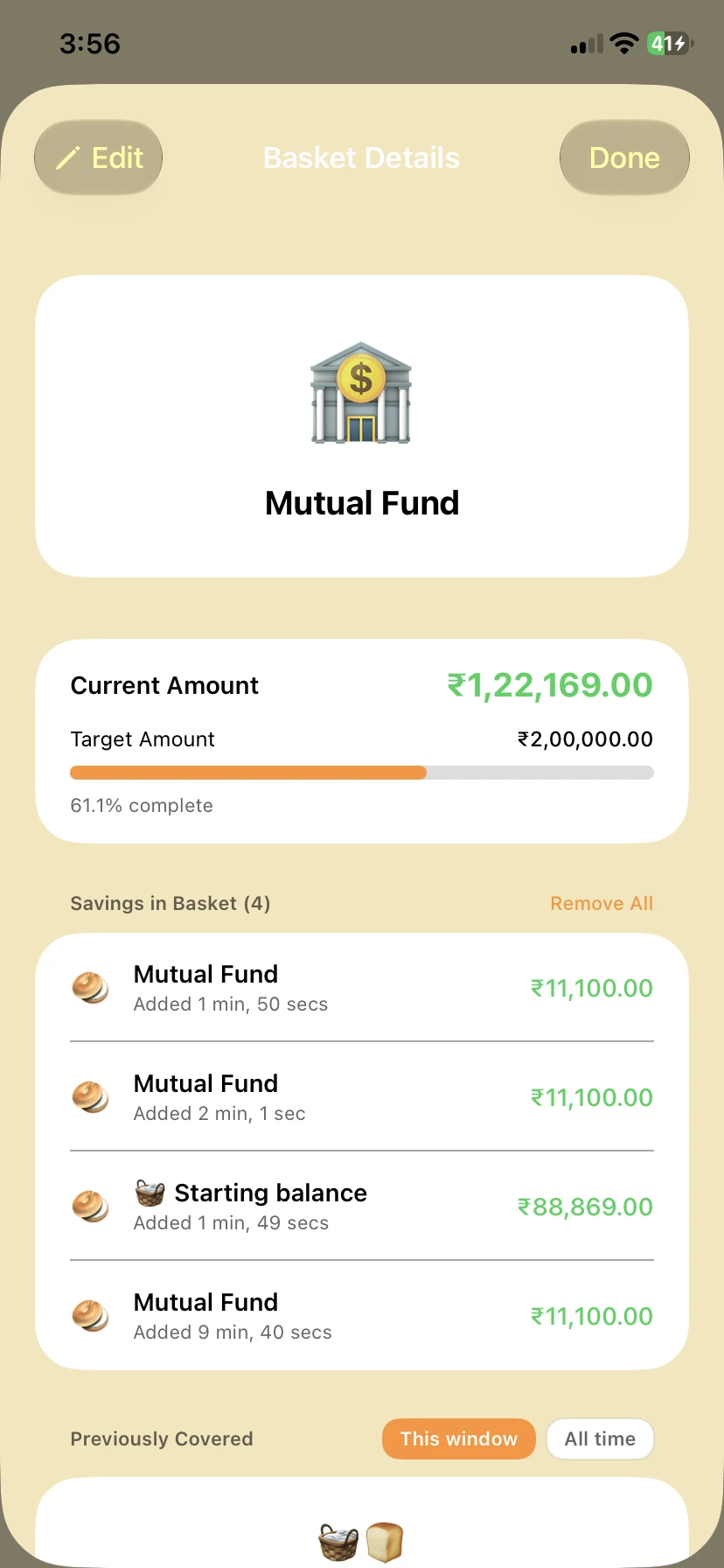
BasketsNamed savings goals, filling up.
Public beta
Help bake LOAF
LOAF is being tested on TestFlight, Apple’s app for trying apps before they launch. Join in, use it for a payday or two, and tell us what could be better.
- Free on TestFlight
- Before it launches
- Talk to the person building it
- 1Install TestFlight from the App Store on your iPhone.
- 2Open the LOAF invite link on that iPhone and tap Install.
- 3Tell us what’s half-baked from Settings → Help & Support in the app.
There’s room for 100 testers for now. If TestFlight says the beta is full, leave your email and we’ll tell you when more spots open up.
Hear when LOAF launches
Leave your email and we’ll write when there’s news about the beta and when LOAF arrives on the App Store.
You’re on the list. We’ll email you when LOAF is ready for you.
That email doesn’t look quite right. Mind checking it?
Something went wrong on our side. Try again, or email aaqib@theloafapp.com and we’ll add you by hand.
We’ll only use your email to contact you about the LOAF beta and launch. See our Privacy Policy.
FAQ
Questions people ask
The same answers you’ll find in the app, under Settings → Help & Support → FAQ.
What is the Cutting Board?
It's your home screen. It shows how much money you have left this month. If you have a card, it also shows how big your next bill is.
What are Review Slices?
It's where you sort your spending. Every expense you add waits there. You swipe each one into Needs, Wants or Savings. That's how LOAF learns where your money went.
What's a basket?
A basket is a savings goal with a name, like "Emergency fund" or "New phone". You put savings into it and watch it fill up.
What's the Savings Garden?
It's a waiting area for savings. When you save money but haven't decided what it's for, it sits in the garden as a loaf of bread. Drag the bread into a basket when you know.
How do I add savings?
Three steps. 1. Tap ➕ and type what you saved, like "Emergency fund 200". 2. Go to Review Slices and swipe it into Savings. 3. It shows up in the garden as bread. Drag it into a basket.
Why does my card have its own section?
Because card spending doesn't leave your bank account straight away. It waits for the bill. LOAF keeps card spending separate so you always know how much is coming and when.
What does "Correct basket" do?
It lowers a basket's amount without recording a payment. Use it when a basket shows more money than you really have. For example, if you paid something from that money outside LOAF.
My payday is the 31st. What happens in February?
LOAF uses the last day of the month instead. In February that's the 28th (or the 29th in a leap year). The same goes for card bill days.
Do I need an account?
Yes. Your account is what keeps your data safe. It backs up your baskets and bread, and it's how they follow you to a new phone. Signing in with Google or Apple takes one tap.
Does LOAF connect to my bank?
No, and it never will. You type in what you spend. LOAF never sees your bank login and never touches your money.
Why does LOAF tell me to keep my bank messages?
Because your bank already sends you a message for every payment. Leave those messages unread until you've added them to LOAF. Then you never have to remember a week of spending from memory.
How do I delete my account?
Go to Settings, then Account, then Delete account. This removes your account and all your data from your phone and from the cloud. It can't be undone.
Which countries does LOAF work in?
India, the UAE, the UK, the US, Canada and Australia. More countries are coming.
How do I watch the tour again?
Go to Help & Support and tap Replay the tour. It's a practice run, so nothing you type in it is saved.
Is LOAF financial advice?
No. LOAF shows you where your money goes and helps you keep some back. It doesn't tell you what to do with it. For advice, talk to someone who knows your situation.
Still stuck? Email aaqib@theloafapp.com and we’ll get back to you.